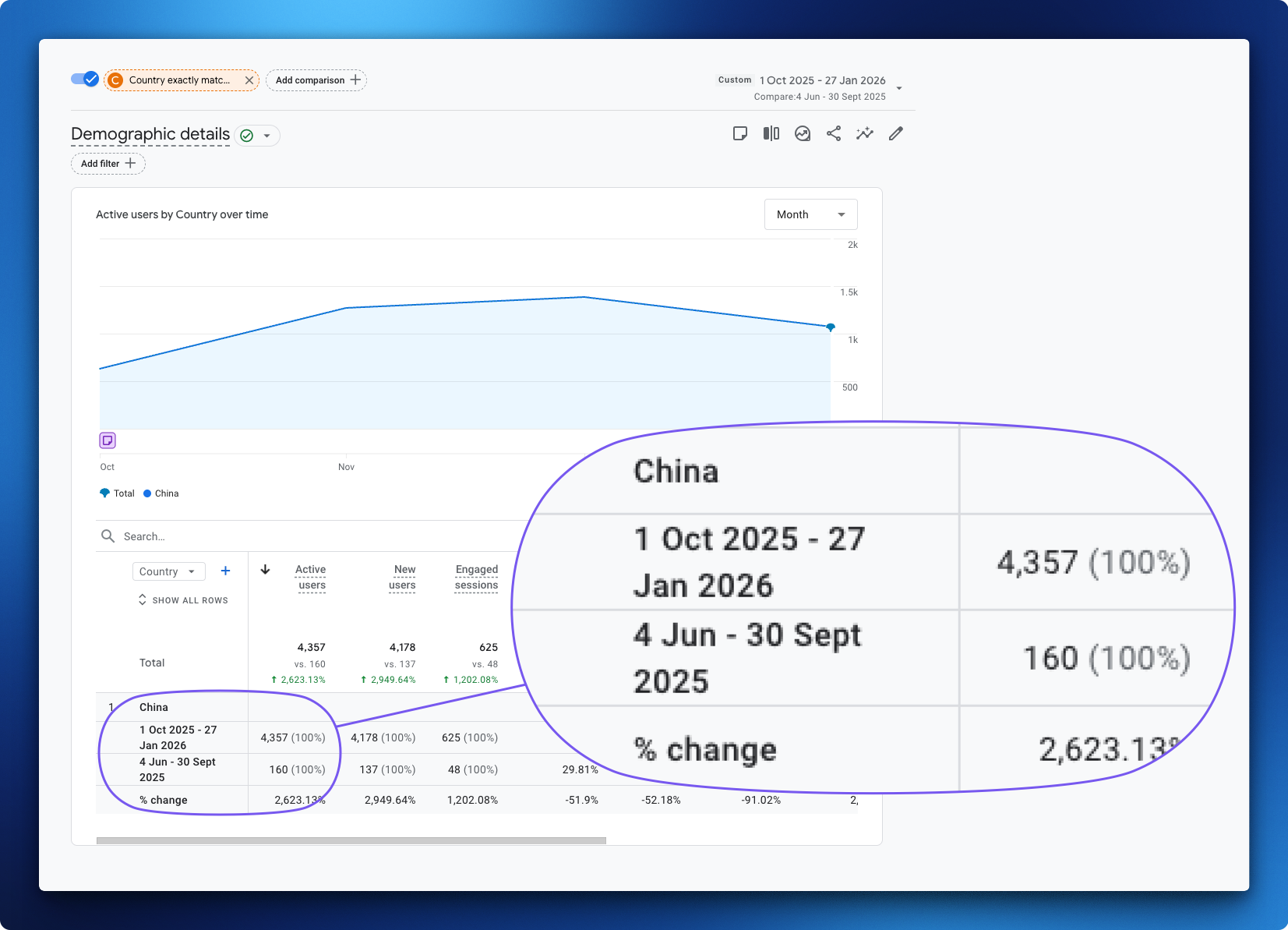
Woke up to a massive traffic spike from China in your GA4 starting in October 2025?
Don’t celebrate. It’s not real.
If you’re seeing a sudden surge of Chinese visitors with zero engagement, sky-high bounce rates, and no conversions, you’ve been hit by spam bots.
And they’re coming from Tencent’s network.
Why Is My GA4 Showing So Much Traffic From China?
Bots are hammering your site. They’re not buying. They’re not reading. They’re just… visiting. Thousands of times.
Your “real” traffic data? Buried under a mountain of fake Chinese traffic.
How to Check If Your GA4 Has China Bot Spam
Here’s how to check:
- Open GA4
- Go to Reports > User Attributes > Demographic Details
- Filter by country: China
Red flags to look for:
- Massive spike in Chinese traffic (especially if you don’t sell there)
- Engagement time near zero (bots don’t read)
- Bounce rate through the roof
- Sessions but no conversions
Also check Reports > Tech > Tech Details and look at the network providers. If you’re seeing Tencent or Chinese ISPs dominating your traffic, you’ve got a problem.
Still not sure? Compare your GA4 numbers to your server logs. If GA4 shows 10x more traffic than your actual server, spam bots are gaming your analytics.
How to Block China Spam Traffic With Cloudflare
If you’re on Cloudflare, here’s what you do:
- Go to Security > WAF
- Create a new rule
- Block these two ASNs: 13220 and 132203
- Save it
That’s it.
How to Know It’s Working
Head to Security > Analytics.
You’ll see your new policy firing immediately. Blocked requests will start stacking up.
It’s oddly satisfying to watch.
How to Filter Out China Spam From Historical GA4 Data
This fix only works moving forward.
Your historical GA4 data? Already polluted. There’s no way to delete it.
When you’re looking at past reports, you’ll need to manually filter out the spam traffic:
- Open any GA4 report
- Click Add Filter
- Set Country to does not exactly match > China
It’s annoying. But it’s the only way to get a clean read on your historical data.
Save this as a default comparison if you’re sick of adding it every time.
Why GA4 Spam Traffic Is Destroying Your Data
Bad data leads to bad decisions.
If you’re making marketing calls based on polluted analytics, you’re flying blind.
Clean your data. Block the spam. Move on with your life.
FAQ
Why is my website getting so much traffic from China?
If you’re seeing a sudden spike in Chinese traffic with near-zero engagement, it’s almost certainly bot spam. These bots originate from networks like Tencent (ASN 13220 and 132203) and inflate your GA4 data without any real user interaction.
Is China traffic in GA4 always spam?
Not always. But if you don’t operate in the Chinese market and you’re seeing thousands of sessions with 0-second engagement times, it’s spam.
Will blocking ASN 13220 and 132203 affect real users?
These ASNs are associated with Tencent’s infrastructure. If you have legitimate Chinese customers, consider a more targeted approach. But for most Western businesses, blocking these ASNs is safe.
Can I delete spam traffic from GA4?
No. GA4 doesn’t let you delete historical data. You’ll need to use country filters when viewing reports to exclude the polluted data.
Now go fix your GA4 before your next board meeting.
Leave a Reply